Restoring Snapshot onto Staging
Restoring a Staging Branch to Staging
1. Login to your AWS Staging account.
2. Navigate to ECS (Elastic Container Service).
3. In the left sidebar, click Task Definitions.
4. In the list of tasks, **look for** and **select** "get_backup_from_s3", followed by the staging branch you need to restore to. ie. get_backup_from_s3_finance
5. With the task definition selected, click Deploy > Run task.
6. Fill out the form with these values:
    a. Existing cluster: Odoo_ECS_Cluster
    b. Capacity provider: EC2
    c. Platform version: LATEST
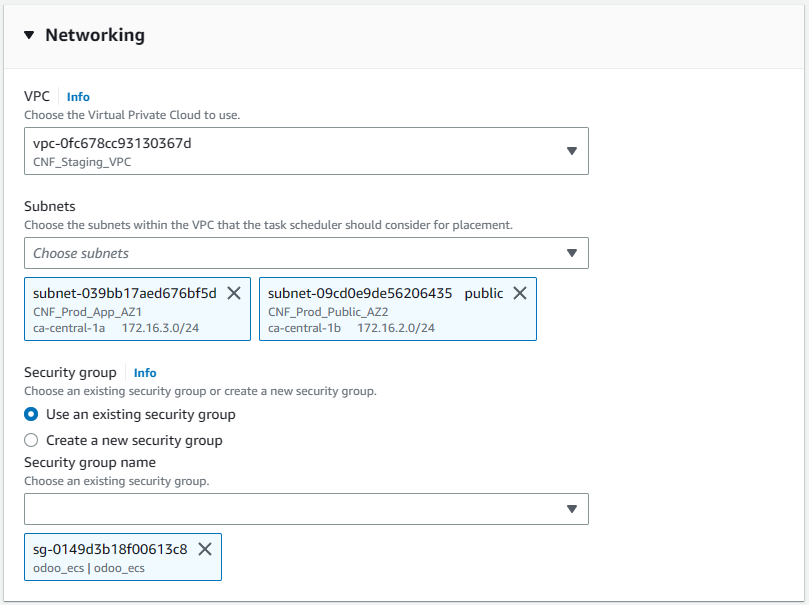
    d. Networking:
        i. VPC: vpc-0fc678cc93130367d
        i. subnet-077271828de6d16ad (CNF_Prod_App_AZ1)
        i. subnet-039bb17aed676bf5d (CNF_Prod_App_AZ2)
    d. Security Groups: odoo_ecs (sg-0149d3b18f00613c8)
6. The remaining fields can be left as default.
7. Click the Create button at the bottom to begin running the task.
8. AWS will redirect you to the Odoo_ECS_cluster, where you should see the get_backup task provisioning/running.
Troubleshooting
Error message API Failure Reason: RESOURCE:ENI
The ECS instance can only run a limited number of parallel tasks. The error message indicates that there are too many tasks running. To resolve, you should open the Clusters in another tab, and stop one of the ECS tasks. Preferably the task for the staging branch you will e restoring.