Guide to Uninstall E-commerce Modules in Odoo
Context
In this Odoo installation, when you attempt to uninstall certain e-commerce modules (emipro_*), you’ll see related modules listed for removal in cascade (e.g. website_sale_uom, cnf_inventory_sync, etc.).
To avoid deleting critical functionality, this guide provides a precise, step-by-step path—using the exact module names and order—so you only remove what you don’t need.
Before You Begin: Environment & Recommendations
- Work in Development or Staging, never directly in Production.
- Enable Developer Mode: Navigate to Settings → Activate Developer Mode to access technical menus.
- Backup your database and source code before each phase.
Emipro Modules (Initial State)
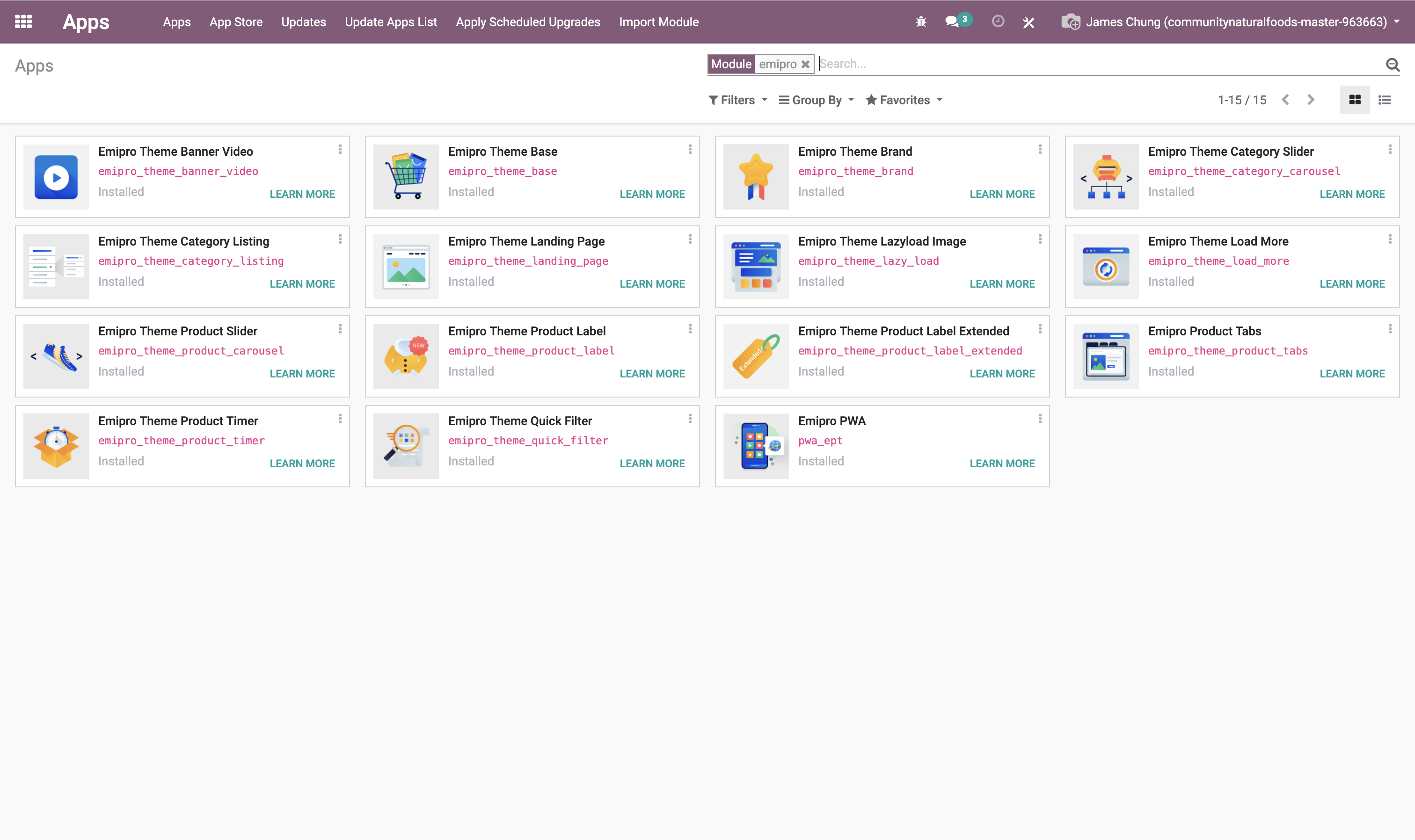
Image 1 – Initial list of installed Emipro modules
Phase 1: Attempt to Uninstall emipro_theme_banner_video
1. Try Uninstalling the Module
- Go to Apps → Installed Modules
- Find
emipro_theme_banner_videoand click Uninstall - A pop-up window appears listing dependent modules that would be removed
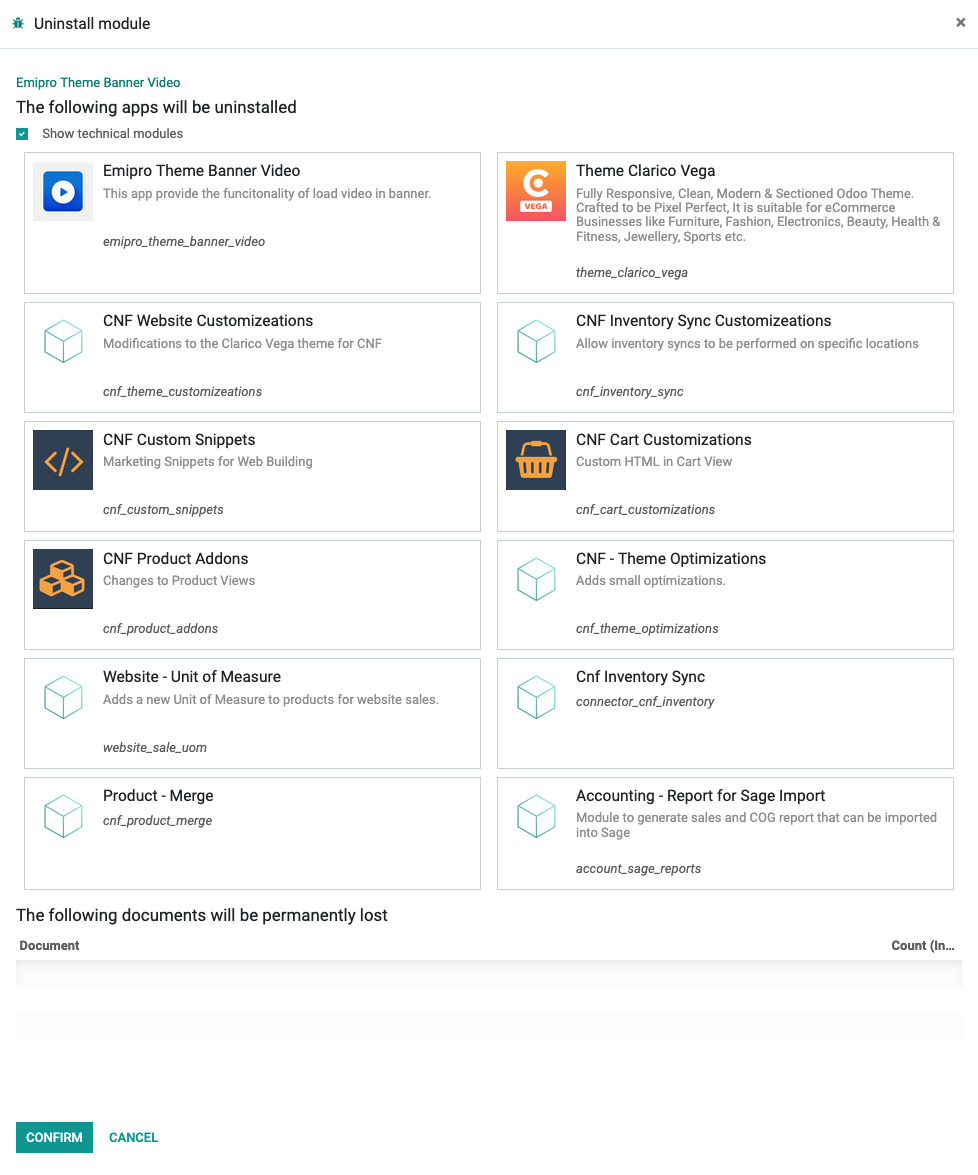
Image 2 – Uninstall confirmation dialog showing dependent modules
2. Comment Out Dependency in website_sale_uom
Edit website_sale_uom/__manifest__.py and comment out the cnf_theme_customizeations line:
3. Comment Out Dependencies from CNF Modules
3.1 In cnf_inventory_sync/__manifest__.py
3.2 In cnf_product_addons/__manifest__.py
'depends': [
    'base',
-  # 'theme_clarico_vega',
    ...
],
'data': [
    'views/product_brand.xml',
-  # 'views/product_tabs.xml',
]
3.3 cnf_cart_customizations/__manifest__.py
4. Prepare cnf_theme_optimization for Removal
Edit cnf_theme_optimization/__manifest__.py:
Comment out the following files:
templates/products_attributes_ept.xmltemplates/quick_filter.xml
5. Restart Odoo
6. Upgrade cnf_product_addons
- Go to Apps → Installed
- Click Upgrade on
cnf_product_addons
7. Upgrade website_sale_uom
- Go to Apps → Installed
- Click Upgrade on
website_sale_uom
✅ Result of Phase 1
The uninstall dialog for emipro_theme_banner_video has been significantly reduced.
Several dependent modules—such as website_sale_uom, cnf_inventory_sync, cnf_product_addons,
cnf_cart_customizations, connector_cnf_inventory, cnf_product_merge, and account_sage_reports—are no longer blocking the uninstall process.
However, the module cannot yet be uninstalled completely due to remaining dependencies, which will be resolved in
the next phase.
 Image 3 – Uninstall dialog showing progress after initial dependency cleanup
Phase 2: Uninstall theme_clarico_vega
1. Locate cnf_theme_optimization Module
- Go to Apps
- Clear any filters
- Search for
cnf_theme_optimization
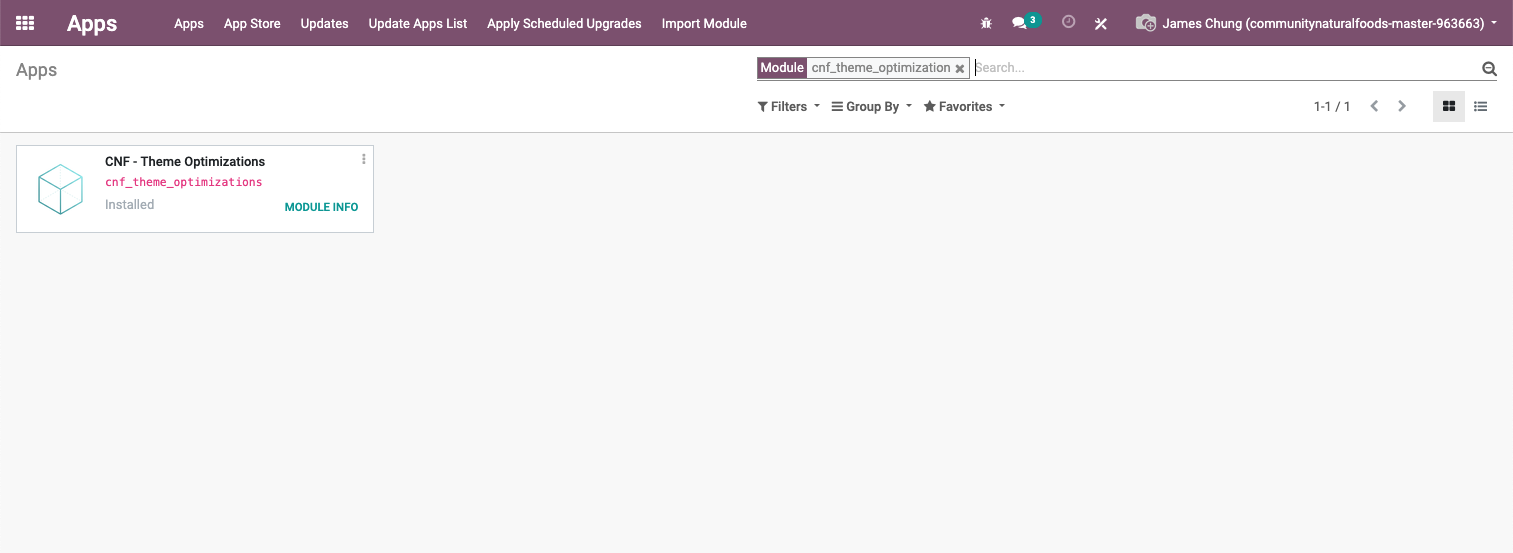
Image 4 – Finding the cnf_theme_optimization module in the Apps menu
2. Open Technical Data
- Click Module Info
- Go to the Technical Data tab
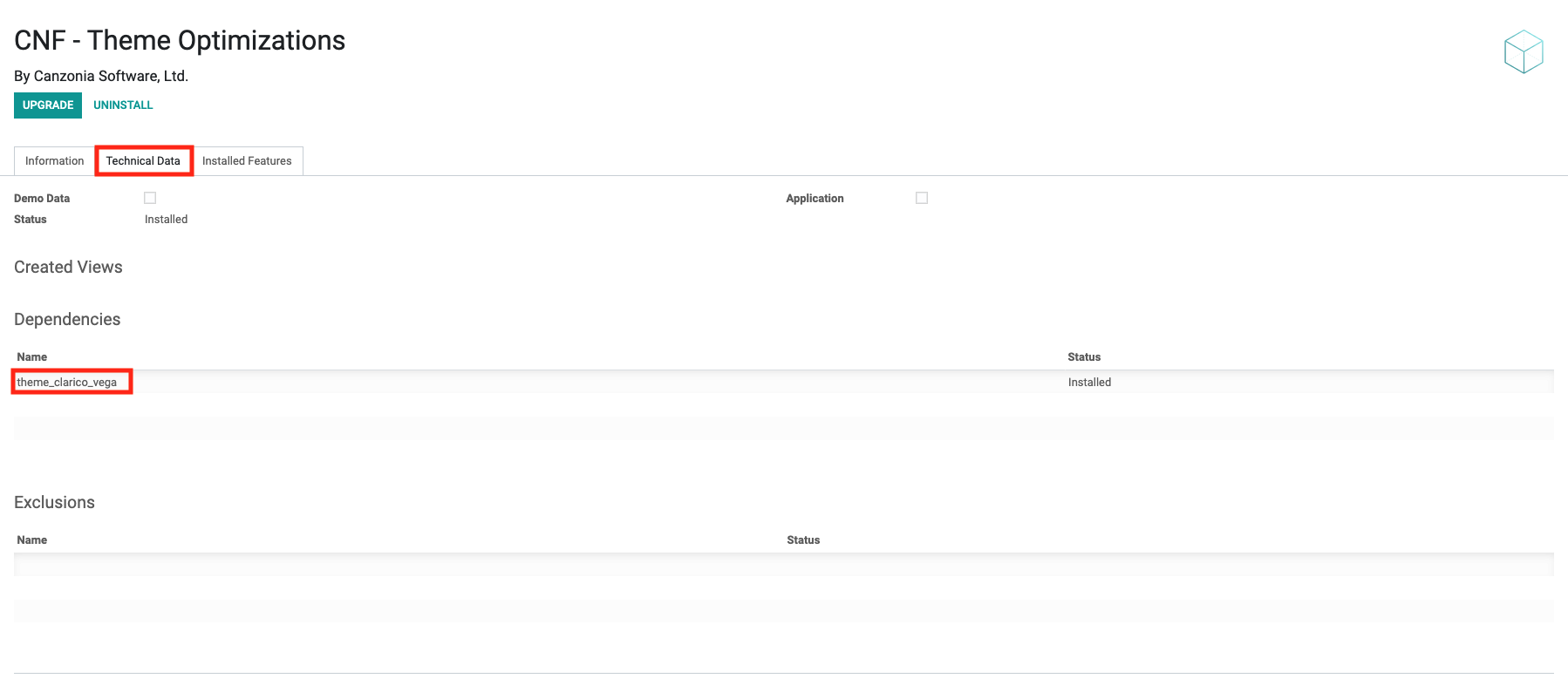
Image 5 – Accessing technical metadata of the module
3. View Dependencies
- Click on
theme_clarico_vegaunder the Dependencies section
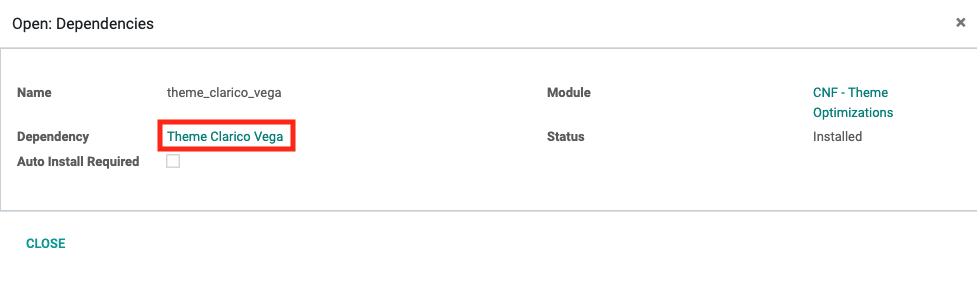
Image 6 – theme_clarico_vega listed as a required dependency
4. Uninstall the Theme
- In the popup, click Theme Clarico Vega, then click Uninstall, and finally click Confirm
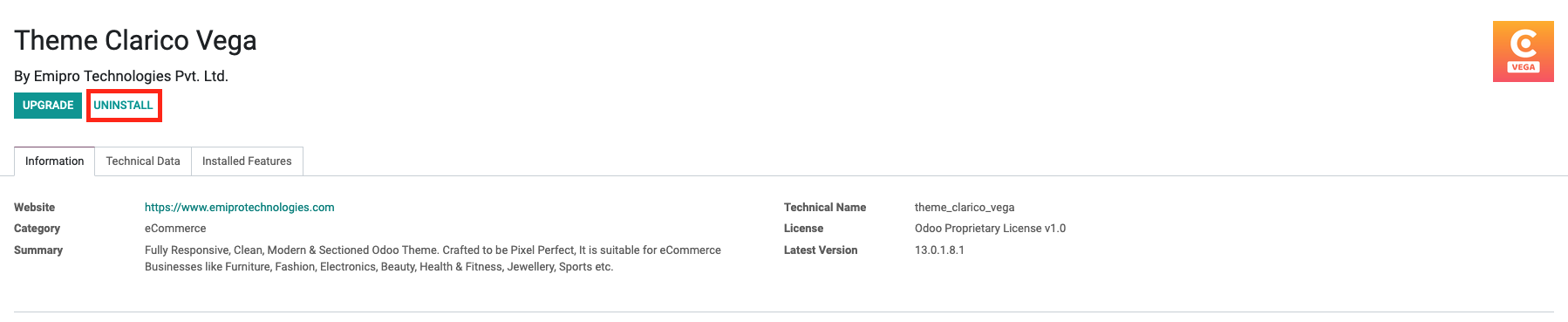
Image 7 – Final uninstall dialog for theme_clarico_vega
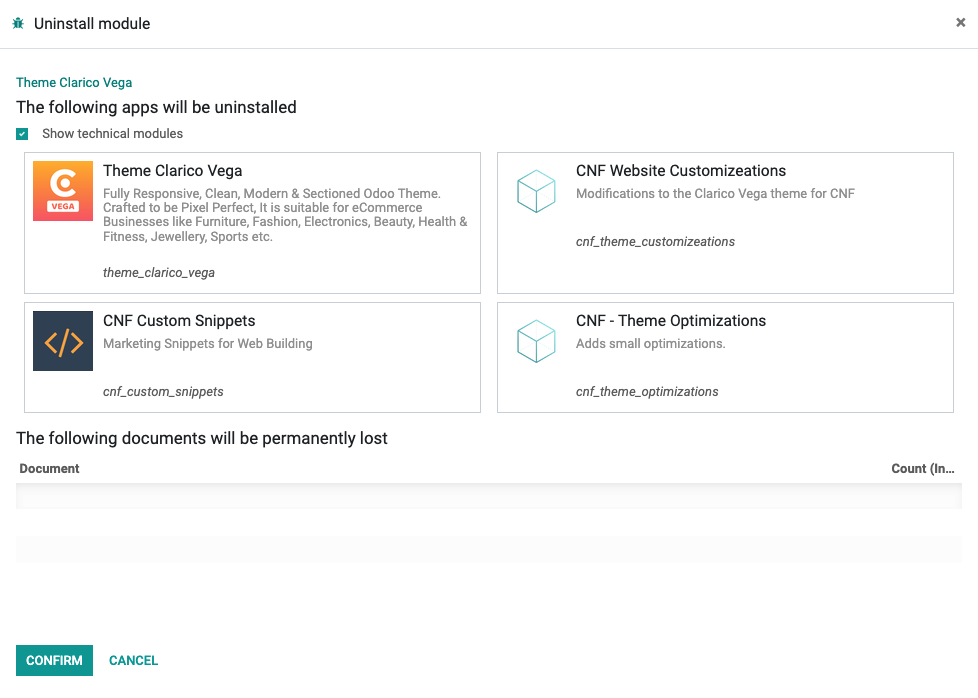
Image 8 – Modules auto-marked for removal when theme_clarico_vega is uninstalled
✅ Result of Phase 2
The theme_clarico_vega module and its dependencies have been successfully removed from the system.
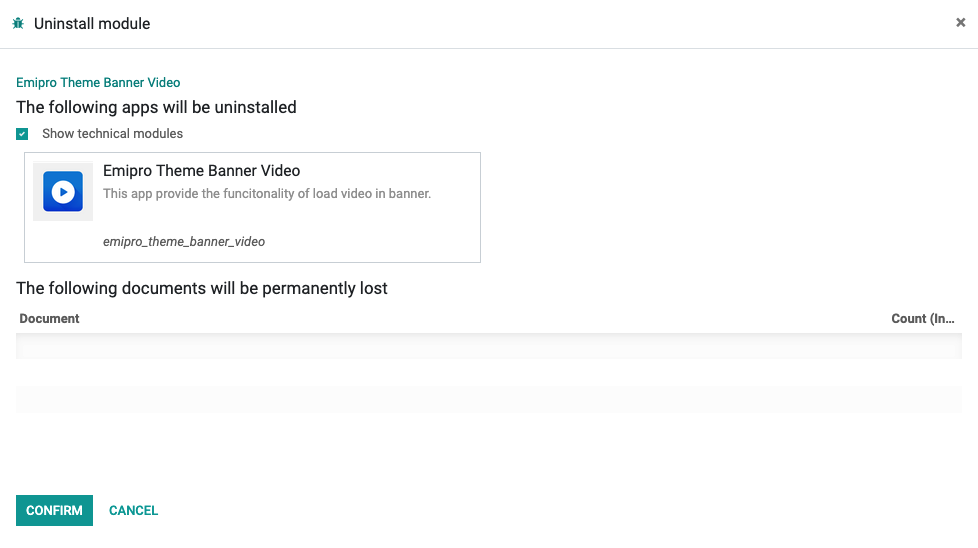
Image 9 – Confirmation dialog after removing theme_clarico_vega
Phase 3: Clean Up emipro_* Modules
Modules to Uninstall
emipro_theme_banner_video
emipro_theme_category_carousel
emipro_theme_category_listing
emipro_theme_landing_page
emipro_theme_lazy_load
emipro_theme_load_more
emipro_theme_product_carousel
emipro_theme_product_label_extended
emipro_theme_product_tabs
emipro_theme_product_timer
emipro_theme_quick_filter
pwa_ept
Uninstall Process
- Go to Apps → Installed
- Click Uninstall for each of the listed modules
Preserved Modules
Phase 4: Troubleshooting Common Uninstall Errors
⚠️ Follow this phase only if you encounter uninstall errors related to views or templates.
These typically occur when leftover views reference fields or templates from modules that have already been uninstalled.
Example error:
AttributeError: 'website' object has no attribute 'is_auto_play'
This happens when a view is trying to use a field that no longer exists because the module that defined it was removed.
1. Identify Orphaned Views
-- Connect to database
psql postgres://odoo:odoo@localhost:5432/communitynaturalfoods-master-963663

-- Search for views with references to removed theme fields
SELECT id, name, model, active
FROM ir_ui_view
WHERE arch_db::text LIKE '%is_auto_play%'
   OR name LIKE '%emipro%'
   OR name LIKE '%clarico%';
Common orphaned views:
- slider_auto_play - References website.is_auto_play from removed theme
- res.config.settings.emipro.base - Emipro theme configuration settings
2. Deactivate Orphaned Views
-- Deactivate identified orphaned views
UPDATE ir_ui_view
SET active = false
WHERE name IN ('slider_auto_play', 'res.config.settings.emipro.base');

-- Or more broadly, deactivate all theme-related orphaned views
UPDATE ir_ui_view
SET active = false
WHERE (arch_db::text LIKE '%is_auto_play%'
   OR name LIKE '%emipro%'
   OR name LIKE '%clarico%')
   AND name NOT IN (SELECT name FROM ir_model WHERE model LIKE 'product.%');
3. Restart Odoo and Verify
4. Delete Orphaned Views (Optional)
After confirming the system works correctly:
-- Delete deactivated orphaned views
DELETE FROM ir_ui_view
WHERE active = false
  AND (name LIKE '%emipro%' OR name LIKE '%clarico%' OR name = 'slider_auto_play');
Emipro Modules (Final State)
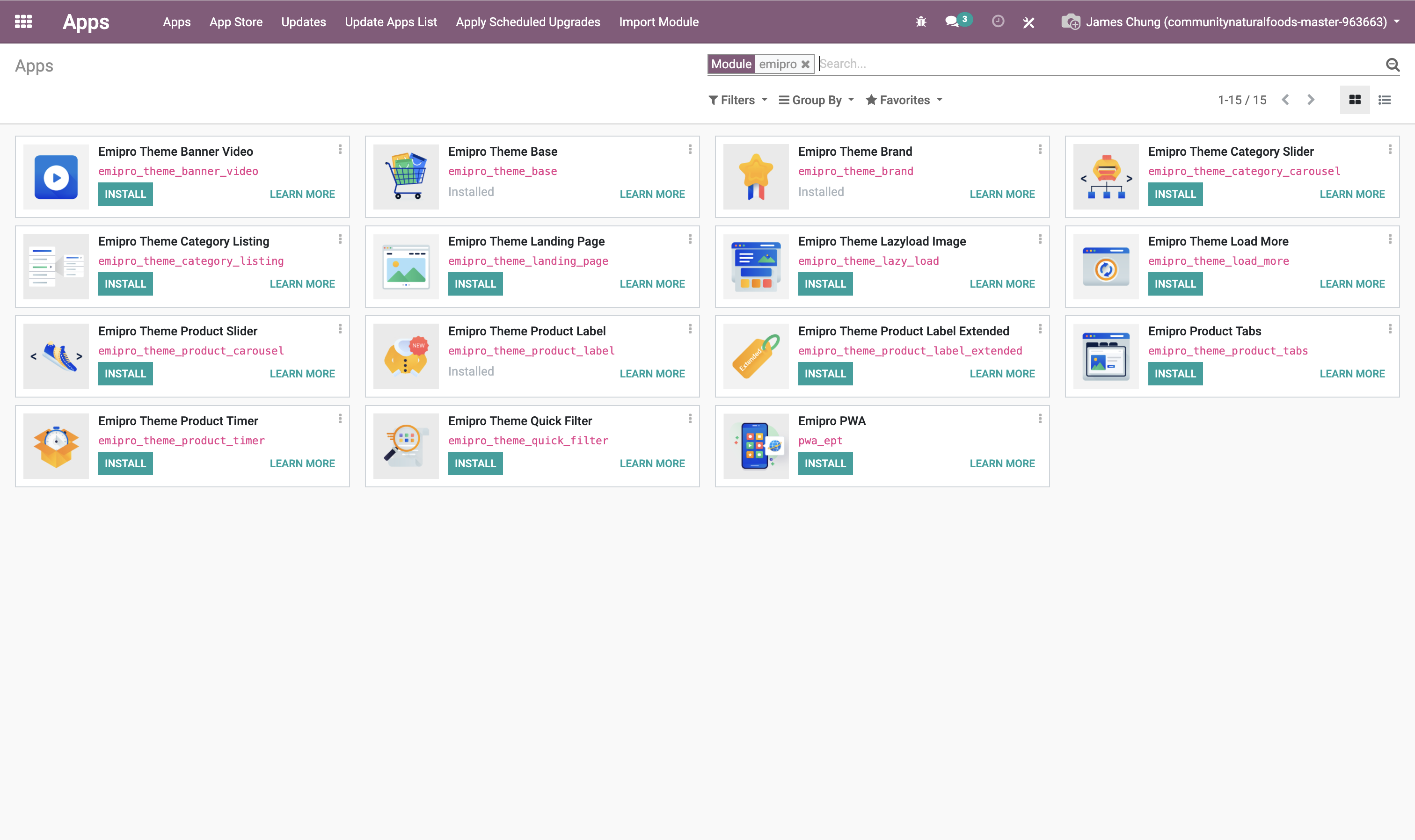
Image 10 – Final state of Emipro-related modules after cleanup
🔧 Future Tasks
- 🔁 Reimplement the functionality of
views/product_tabs.xmlfromcnf_product_addonsinto a dedicated custom module. - 🔍 Audit other CNF modules to identify unnecessary view or data files.
- 🛠 Refactor templates to align with the frontend theme architecture.
- ✅ Document these changes in your technical migration logs.
Final Tips
- ✅ Test Critical Workflows: Confirm everything still works as expected—checkout, inventory, and frontend navigation.
- 📝 Keep Documentation Updated: Note which modules were removed and why.
- ♻️ Plan for Rollback: Always keep a backup or snapshot.
📋 Summary Table
| Status | Module Name | Action |
|---|---|---|
| ✅ | emipro_theme_banner_video | Uninstalled |
| ✅ | theme_clarico_vega | Uninstalled |
| ✅ | cnf_theme_customizeations | Uninstalled |
| ✅ | cnf_custom_snippets | Uninstalled |
| 💾 | cnf_cart_customization | Retained |
| ✅ | cnf_theme_optimization | Uninstalled |
| 💾 | cnf_inventory_sync (patched) | Retained |
| 💾 | cnf_product_addons (patched) | Retained |
| ✅ | emipro_theme_category_carousel | Uninstalled |
| ✅ | emipro_theme_category_listing | Uninstalled |
| ✅ | emipro_theme_landing_page | Uninstalled |
| ✅ | emipro_theme_lazy_load | Uninstalled |
| ✅ | emipro_theme_load_more | Uninstalled |
| ✅ | emipro_theme_product_carousel | Uninstalled |
| ✅ | emipro_theme_product_timer | Uninstalled |
| ✅ | emipro_theme_quick_filter | Uninstalled |
| ✅ | emipro_theme_product_label_extended | Uninstalled |
| ✅ | emipro_theme_product_tabs | Uninstalled |
| ✅ | pwa_ept | Uninstalled |
| 🔒 | emipro_theme_base | Preserved |
| 🔒 | emipro_theme_brand | Preserved |
| 🔒 | emipro_theme_product_label | Preserved |